Document 3 of 13
Roles and permissions
The 23 permissions, the 7 default roles, the visibility rules.
For whom: Administrators
In Orafila, what a person sees and can do depends on their roles. A role is a set of permissions; a person can have several roles and gets all their permissions combined. Roles are managed in Settings › Roles and given to people in Settings › Users.
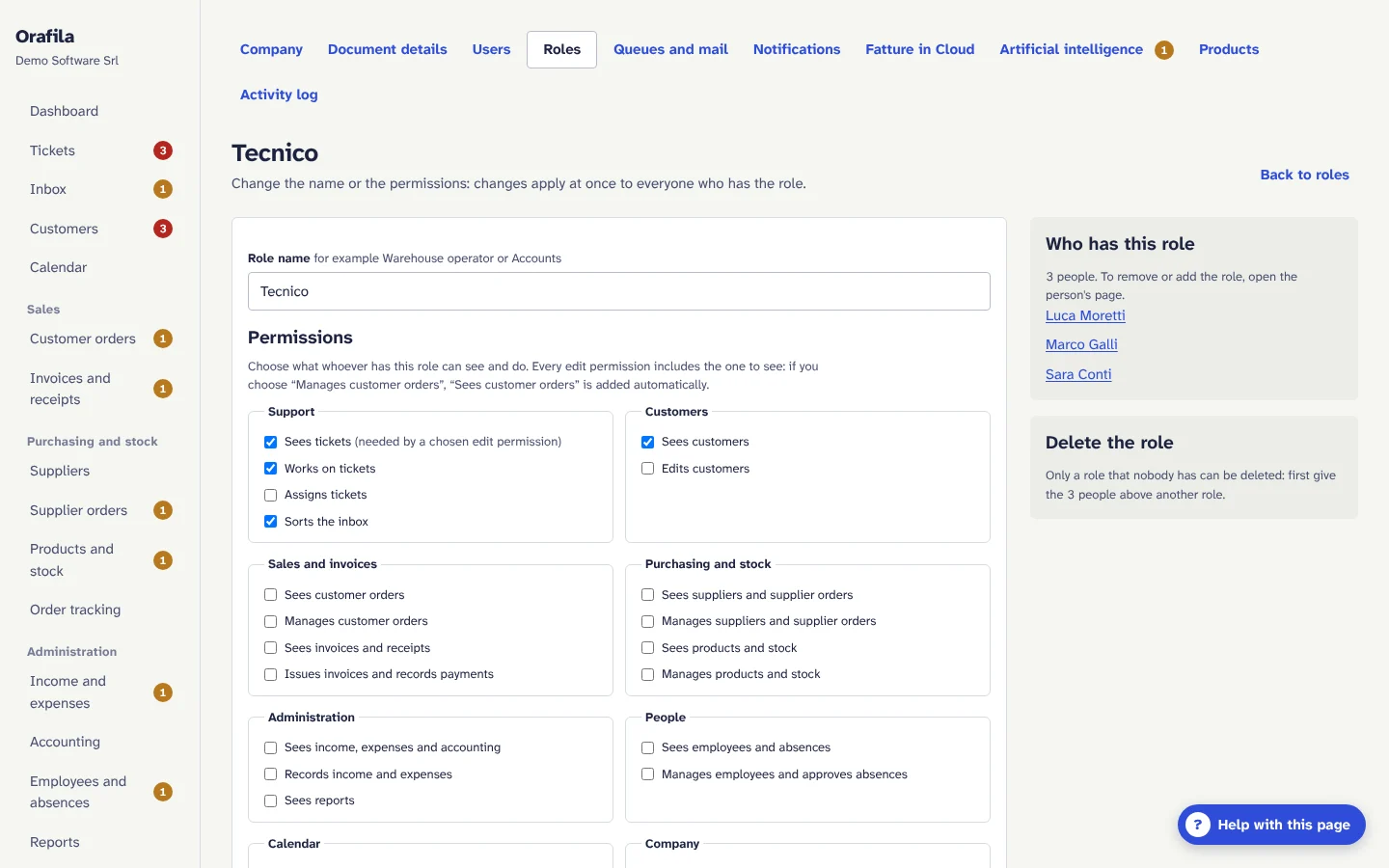
The permissions
There are 23, grouped by area as on the roles page. The “Description” column completes the sentence “This role…”.
| Area | Permission | Description |
|---|---|---|
| Support | tickets.read |
sees tickets |
tickets.write |
works on tickets (replies, changes the status, logs time, takes tickets) | |
tickets.assign |
assigns tickets to colleagues | |
inbound.manage |
sorts the inbox | |
| Customers | customers.read |
sees customers |
customers.write |
edits customers (including contracts, hour banks, contacts, installed products, CSV import) | |
| Sales and invoices | sales.read |
sees customer orders |
sales.write |
manages customer orders | |
invoices.read |
sees invoices and receipts | |
invoices.write |
issues invoices and records payments | |
| Purchasing and stock | purchases.read |
sees suppliers and supplier orders |
purchases.write |
manages suppliers and supplier orders | |
inventory.read |
sees products and stock | |
inventory.write |
manages products and stock | |
| Administration | finance.read |
sees income, expenses and accounting |
finance.write |
records income and expenses | |
reports.read |
sees reports | |
| People | employees.read |
sees employees and absences |
employees.write |
manages employees and approves absences | |
| Calendar | calendar.read |
sees the whole company and group calendars |
calendar.write |
adds events to the calendar | |
| Company | ai.use |
uses the AI assistant |
settings.manage |
manages settings and users |
Every edit permission includes the one to see: if you choose “manages customer orders”, the page adds “sees customer orders” by itself.
The seven default roles
Every company starts with these roles (with these English names if the company is activated in English, with Italian names otherwise). They can be changed, and others can be created (for example “Warehouse operator” or “Bookkeeping”).
| Permission | Administrator | Support manager | Technician | Sales | Accounts | Warehouse | Human resources |
|---|---|---|---|---|---|---|---|
| sees tickets | ✓ | ✓ | ✓ | ✓ | |||
| works on tickets | ✓ | ✓ | ✓ | ||||
| assigns tickets | ✓ | ✓ | |||||
| sorts the inbox | ✓ | ✓ | ✓ | ||||
| sees customers | ✓ | ✓ | ✓ | ✓ | ✓ | ||
| edits customers | ✓ | ✓ | |||||
| sees customer orders | ✓ | ✓ | ✓ | ✓ | |||
| manages customer orders | ✓ | ✓ | |||||
| sees invoices and receipts | ✓ | ✓ | ✓ | ||||
| issues invoices and records payments | ✓ | ✓ | |||||
| sees suppliers and supplier orders | ✓ | ✓ | ✓ | ||||
| manages suppliers and supplier orders | ✓ | ✓ | ✓ | ||||
| sees products and stock | ✓ | ✓ | ✓ | ✓ | |||
| manages products and stock | ✓ | ✓ | |||||
| sees income, expenses and accounting | ✓ | ✓ | |||||
| records income and expenses | ✓ | ✓ | |||||
| sees reports | ✓ | ✓ | ✓ | ✓ | ✓ | ||
| sees employees and absences | ✓ | ✓ | ✓ | ||||
| manages employees and approves absences | ✓ | ✓ | |||||
| sees the whole company and group calendars | ✓ | ✓ | ✓ | ✓ | ✓ | ✓ | ✓ |
| adds events to the calendar | ✓ | ✓ | ✓ | ✓ | ✓ | ✓ | ✓ |
| uses the AI assistant | ✓ | ✓ | ✓ | ✓ | ✓ | ✓ | ✓ |
| manages settings and users | ✓ |
Rules to know
Combinations of permissions
- Order tracking has no permission of its own: it shows customer orders to people who see them and supplier orders to people who see those.
- “Create invoice” from an order requires seeing customer orders and issuing invoices (for example the Accounts role).
- Recording a supplier's invoice from an order requires seeing supplier orders and recording income and expenses.
- Settings › Products (the catalogue of installed products) requires managing settings and editing customers.
- The internal cost and margin of tickets are visible to people who see reports; the hourly cost of employees only to people who manage them; the expenses recorded on a supplier's page only to people who see income and expenses.
- In reports, each section also requires the permission of the area the figures come from (Sales with invoices, People with employees and so on).
What applies to everyone
- Dashboard, Password and sessions, the language, the “Help with this page” button, the guides and the health check (limited to the modules the person can see). AI answers require “uses the AI assistant”.
- My absences requires no permission: the user only needs to be linked to a record in Employees and absences.
Who receives what
- Only active users with a role that works on tickets appear among the agents a ticket can be assigned to.
- The reorder level alert goes to people who manage products and stock; absence requests go to people who manage employees, and the decision goes to the person who asked.
Calendar
- Everyone sees every group's calendar, but writes only in the whole company calendar and in their own groups' calendars; people who manage settings and users write in all of them and create the groups.
- Colleagues' absences appear as “Away”, without the type, to people who cannot see employees and absences.
Protections
- The company always has at least one active administrator: the last one cannot be removed, and nobody can suspend themselves or remove their own administrator role.
- A role can be deleted only if nobody has it.
- Permission changes apply from the next page the person opens, with no need to sign out.
- Every action is checked again on the server: hiding a button is not the only safeguard against anyone trying to get round the interface, because the request is refused if the permission is missing.
- Every change to users and roles goes into the activity log.